Guide · 07
Color
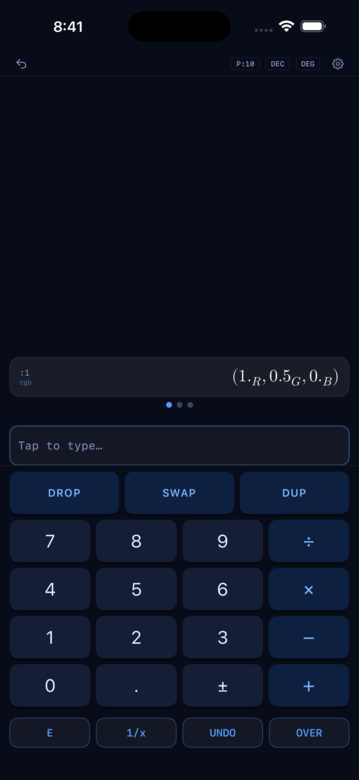
Color is a first-class stack type in RP42. Push three normalized RGB components, tap ->RGB, and you have an RGB card — with a swatch, a detail sheet, and a path to every other color space.
Color types at a glance
| Type | What it holds |
|---|---|
rgb | Normalized RGB triple — display-referred |
qrgb | Quantized RGB (8/10/12-bit integer triples) |
rgbspace | An RGB color space (primaries + EOTF + white point) |
eotf | An electro-optical transfer function (sRGB, BT.1886, PQ, HLG, …) |
xyy, xyz | CIE chromaticity and tristimulus values |
lab | CIE L*a*b* |
ycbcr, qycbcr | Luma + chroma (normalized and quantized) |
ictcp | IC_T_C_P (Rec.2100 HDR color appearance) |
Constructing a color
The simplest: R G B ->RGB (three normalized doubles, top-of-stack RGB).
1.0 0.5 0.0 ->RGBThe card on the stack shows a swatch alongside the components. Tap to open the detail sheet — R, G, B values and a hex code. To explore the color geometrically — chromaticity, gamut, comparisons — convert it with ->xyY (one point on the CIE diagram) or push it into an rgbspace card (the full primaries triangle).
Converting between spaces
->XYZ, ->LAB, ->YCBCR, ->ICTCP, ->XYY go forward. XYZ->, LAB->, etc. go back. Most conversions need a working RGB space — the engine carries one (default Rec.709) and uses it implicitly. Change it with ->wRgbSpace:
bt.2020 ->wRgbSpaceAfter that, RGB↔XYZ matrices and EOTF application use BT.2020 PQ.
Camera log + working spaces
Beyond the display/broadcast standards, RP42 ships a set of cinema and prosumer camera encodings and the ACES working spaces graders use in post:
Camera logs (linear-toe → log body):
SLog3 (Sony + S-Gamut3.Cine) · LogC3 (ARRI + AWG3) · LogC4 (ARRI + AWG4) · CLog3 (Canon + Cinema Gamut) · VLog (Panasonic + V-Gamut) · FLog (Fujifilm) · NLog (Nikon) · DLog (DJI) · Log3G10 (RED + REDWideGamutRGB) · JLog1 (JVC)
ACES working spaces:
ACES2065_1 (AP0, linear — archival) · ACEScg (AP1, linear — grading working space) · ACEScc (AP1, log — color-correction) · ACEScct (AP1, log with linear toe)
Each is a bare RPN word — type it and the space appears on the stack. They’re all scene-referred: signal 1.0 maps to a scene-linear value well above SDR white (S-Log3 → ~38, LogC3 → ~55), which is the whole point of log encoding — 10+ stops of scene dynamic range compressed into [0..1] signal space. The EOTF curve panel auto-scales to each space’s natural range so the full toe + log-body compression is visible.
Chromaticity detail
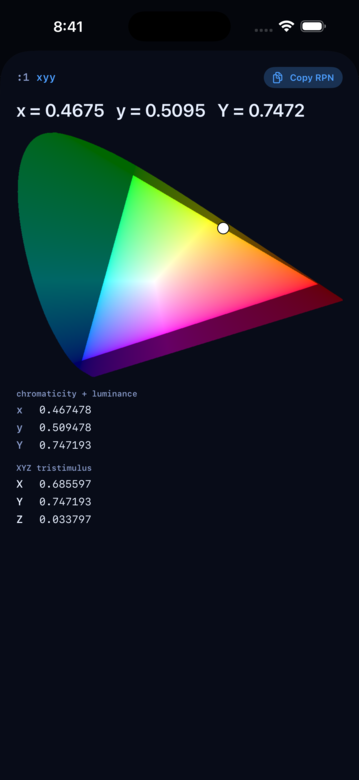
Two cards render the CIE chromaticity diagram:
- An
xyYdetail card plots a single (x, y) point — your color — over the diagram with sRGB / Rec.2020 gamut overlays. - An
rgbspacedetail card plots the full red / green / blue / white primaries of the space as a triangle.
Push into either and scroll to the chromaticity panel. Other color cards (rgb, xyz, lab, qrgb, ycbcr, ictcp) show their components but not the diagram — convert when you want the geometric view.
EOTFs
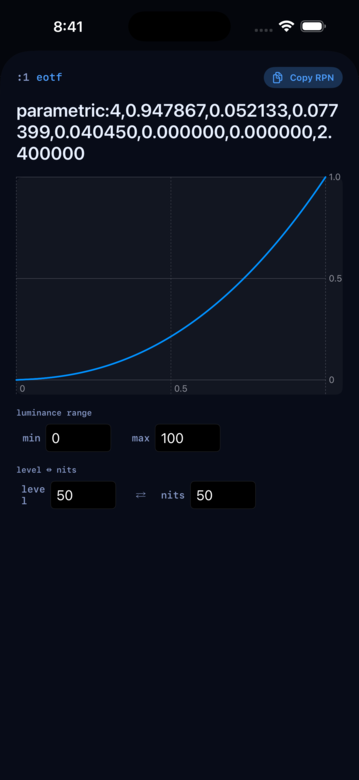
An EOTF — Electro-Optical Transfer Function — is the curve a display uses to turn a signal (a code, a normalized [0..1] level) into physical light (nits). RP42 treats it as a first-class stack type.
Push one
Every named EOTF is a bare RPN word:
Standards
PQ-EOTF · HLG-EOTF · BT1886-EOTF · sRGB-EOTF
Camera log family (linear-toe + log-body)
SLog3-EOTF · LogC3-EOTF · LogC4-EOTF · VLog-EOTF · FLog-EOTF · DLog-EOTF
Bespoke camera logs
Log3G10-EOTF · ACEScc-EOTF · ACEScct-EOTF · CLog3-EOTF · NLog-EOTF · JLog1-EOTF
Push one and inspect its curve in the detail sheet. The plot’s Y-axis auto-scales to each EOTF’s natural range, so SDR and HDR-normalized curves keep their familiar [0..1] look while camera-log curves expand to show the full log-body compression.
Build a custom one
For EOTFs whose parameters you supply on the stack:
->GAMMA-EOTF— pop a gamma exponent, push a power-law EOTF.->BT1886-EOTF— pop( lb lw gamma ), push a BT.1886 with custom reference levels.->ICC-EOTF— pop the ICC parametric curve’s eight params, push the EOTF.->LinLog-EOTF— pop seven doubles + a name, push a linear-toe + log-body EOTF. This is the shape behind every camera-log preset above, exposed for custom encodings.
The generic ->EOTF still accepts a name string and dispatches to the right constructor, useful when you’re driving the engine from an external tool.
Apply one
EOTF and iEOTF take the value at TOS and the EOTF at NOS:
->PQ-EOTF 0.65 EOTF     ( applies PQ forward, signal -> light )
->PQ-EOTF 413 iEOTF     ( applies PQ inverse, light -> signal )
The EOTF stays at NOS so OVER lets you reuse it across a run of values.
If the physics-standard EOTF / iEOTF naming feels backwards, direction-descriptive aliases match one-to-one: SIGNAL->LIGHT for EOTF, LIGHT->SIGNAL for iEOTF.
Nits ↔ code, directly
The physical-unit shortcuts fold the manual /reference_nits · × 2^bits - 1 dance into one call each:
NITS->LEVEL ( eotf nits -- level )— luminance in nits → normalized signalLEVEL->NITS ( eotf level -- nits )— normalized signal → luminance in nitsNITS->CODE ( eotf nits bits -- code )— luminance in nits → integer code at a bit depthCODE->NITS ( eotf code bits -- nits )— integer code → luminance in nitsREF-NITS ( eotf -- nits )— the EOTF’s reference luminance (100, 1000, or 10000)
So the classic “what’s the 10-bit PQ code for 413 nits?” collapses to:
->PQ-EOTF 413 10 NITS->CODE ( -- 671 )RgbSpace does double duty
Every EOTF operation that takes an EOTF at NOS also accepts an rgbspace at NOS — the space’s baked-in EOTF gets used. So the same question, using BT.2020’s built-in PQ:
bt.2020 413 10 NITS->CODE ( -- 671 )And with an rgbspace on the stack at TOS, EOTF acts as an extractor, pushing the space’s EOTF — sitting alongside the other component extractors (RED, GREEN, BLUE, WHITE).
Overloads for color types
EOTF and iEOTF also apply to color-typed values, not just scalars. EOTF accepts rgb (component-wise), qrgb (decode to linear RGB), and — when there’s an rgbspace at NOS — ycbcr and qycbcr (routed through the space’s matrix). iEOTF accepts rgb component-wise plus xyz / xyy Y-only. Lab and ICtCp are intentionally omitted — they’re mixed-encoding types whose component-wise application doesn’t have clean physics; route through RGB when you need a transfer applied.