Guide · 11
Finance
A real time-value-of-money calculator. Annual rate, payments per year, compounding-per-year, and continuous compounding — first-class, deparse-round-trippable, and a tap-to-edit card that solves for any variable.
Two ways in
The TVM tile. Swipe left on the page-dots strip (or on the REPL area above the keypad) to reach Page 3, then tap the TVM tile under Finance. A blank TVM card opens with the HP-12C defaults — P/Y = 12, end-of-period payments, no values filled in. Fill the rows, pick a variable in the segmented Solve for control at the bottom, and the answer lands in the solved-row badge. When you dismiss the sheet the solved TVM sits on the stack as a single card.
See the Card calcs page for the general anatomy of a card — field editing and the solve-for picker work the same way on TVM as they do on RunPace or Pizza Dough. TVM’s rows are plain numbers, so unlike RunPace or Pizza Dough there are no unit chips.
From the REPL. TVM on its own pushes a fresh time-value-of-money object onto the stack:
TVMTap the card to open the same detail sheet you’d have gotten from the tile.
The eight knobs
A TVM holds eight independent settings. The five solvers tell the engine which of the numeric five to compute from the others:
| Variable | Meaning |
|---|---|
N | Number of payment periods |
I%YR | Annual interest rate, percent |
PV | Present value (money in your hand at the start; negative if borrowed) |
PMT | Payment per period (negative for outflows) |
FV | Future value |
BEG / END | Whether payments fall at the start or end of each period |
P/Y | Payments per year |
C/Y | Compounding periods per year (or Same as P/Y / Continuous) |
The I%YR naming mirrors the HP-28S / HP-48 labeling — the rate is annual, not per-period. The engine derives the period rate from I%YR, P/Y, and C/Y whenever it needs to.
Solving for a variable
The classic mortgage problem. $300,000 loan, 30 years, 5% annual, monthly payments.
Card path. Open the TVM tile. Type 360 in the N row, 5 in the I%YR row, -300000 in the PV row, leave FV at 0, and pick Solve PMT in the segmented control. The output banner shows the monthly payment, and PMT gets a small ● solved badge on its row.
REPL path. Same problem, faster once you know the words:
TVM
360 TVM-N
5 TVM-I%YR
-300000 TVM-PV
0 TVM-FV
SOLVE-PMTThe result deparses back to itself losslessly:
360. 5. -300000. 0. 0. FALSE 12. 0. ->TVM SOLVE-PMTYou can copy that fragment, paste it into another session (or share it with a collaborator), and reconstruct the exact same TVM state.
Annual rate, period math
The engine stores I%YR as annual percent. The math derives the per-period rate from I%YR, P/Y, and C/Y. When C/Y tracks P/Y — the default — the formula collapses to the textbook HP-12C identity:
When C/Y ≠ P/Y — daily compounding on a monthly-pay loan, say — the engine uses the standard nominal-compounding conversion:
And under continuous compounding the limit:
All three branches share the same rate(t) helper inside the engine, so every solver (SOLVE-N, SOLVE-FV, …) and AMORT pick up the compounding mode automatically. The continuous-rate derivation cross-checks against the engine’s separate CONT->EFF word to identical bits — two independent paths, the same answer to the last digit.
Daily-compounded mortgage
Same $300,000 / 30-yr / 5% APR loan, but daily compounding:
TVM
360 TVM-N
5 TVM-I%YR
-300000 TVM-PV
0 TVM-FV
365 TVM-C/Y
SOLVE-PMT
The payment is slightly higher than the monthly-compounded case — daily compounding bites a little. HP-12C doesn’t support this; HP-17B’s Other Periods mode does. Here it’s two taps in the detail card.
Cashflows: NPV and IRR
Discount a cash-flow stream at a known rate:
[ -1000 200 300 400 500 ] 8 NPV…or recover the rate that makes the NPV zero:
[ -1000 200 300 400 500 ] IRRBoth work on a vector of cashflows where the first entry is the period-0 outflow (typically negative). NPV takes the rate as a percent per period; IRR returns one in the same units.
Amortization
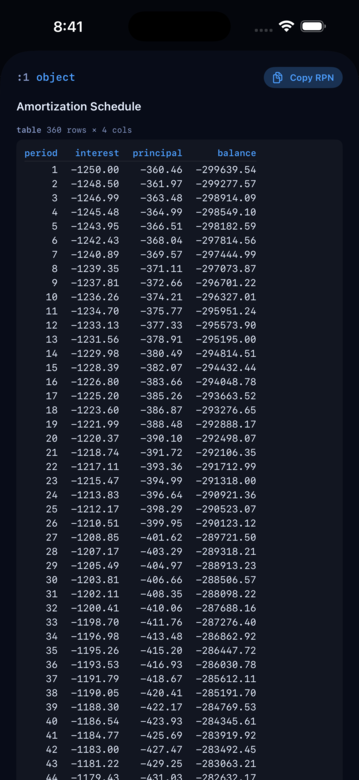
AMORT walks a solved TVM through its schedule and pushes a structured object with per-period interest, principal, balance, plus the totals:
TVM
360 TVM-N  5 TVM-I%YR  -300000 TVM-PV  0 TVM-FV  SOLVE-PMT
AMORT
The amortization object lives on the stack alongside the TVM; tap it to see the full table.
Rate conversions
The standard nominal ↔ effective conversions, useful for translating quoted rates between conventions:
| Word | Direction |
|---|---|
NOM->EFF | nominal annual % + periods → effective annual % |
EFF->NOM | effective annual % + periods → nominal annual % |
CONT->EFF | continuous nominal % → effective annual % |
EFF->CONT | effective annual % → continuous nominal % |
REAL->NOM | real annual % + inflation % → nominal annual % |
NOM->REAL | nominal annual % + inflation % → real annual % |
When the TVM C/Y matches the rate’s compounding convention, you don’t need the nominal/effective pair — the engine handles the math internally. The real/nominal pair is for stripping or adding an inflation adjustment. They’re all here for cases where the quoted rate doesn’t match how you want to model the cashflow.
Depreciation, inflation, percent change
A handful of one-shot utilities:
DEP-SL/DEP-DB/DEP-SOYD— straight-line, declining-balance, sum-of-years-digits depreciation schedulesCPI— US CPI-U annual index lookupINFL-ADJUST— adjust a dollar amount between two years by CPI%,%CHG,%T— percentage of base, percent change, percent of totalMU-COST,MU-PRICE— markup on cost vs markup on price
The 19 top-level financial words are in the reference. The TVM-* and SOLVE-* words that back the card live in a hidden .finance category — you can type them at the REPL, but they don’t show up in the tabs.
What’s different from HP-12C
| Feature | HP-12C | RP42 |
|---|---|---|
| TVM solvers | Yes (5) | Yes (5), same names + SOLVE-I%YR |
| Default P/YR | 12 | 12 |
| BEG / END | Yes | Yes (TVM-BEGIN / TVM-END) |
| Continuous compounding | No | Yes (TVM-C/Y-CONTINUOUS) |
| C/Y ≠ P/Y | No | Yes (TVM-C/Y) |
| Deparse round-trip | — | Lossless |
| Tap-to-edit detail card | — | Yes |
| Cashflows + NPV + IRR | Yes (CFj) | Yes (vectors + NPV / IRR) |
| AMORT | Yes (per-batch) | Yes (full schedule object) |
If you live in the HP-12C, you’ll be at home immediately and you’ll have a few new doors to walk through.