Guide · 12
Settings & themes
Tap the gear in the status bar to open Settings. Two sections: Engine (controls that change how the engine reports numbers) and Appearance (theme + digit grouping). On the Mac, ⌘, opens the same sheet from the RP42 menu.
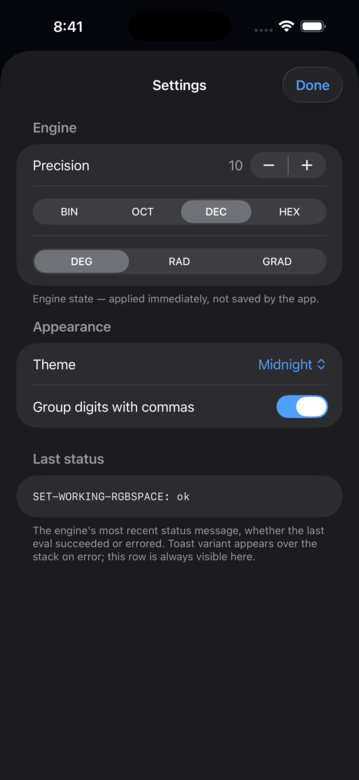
Engine settings
- Precision. Number of significant digits in the displayed values. The underlying compute is always full double precision — this only affects display.
- Radix. Display radix for integers: 2 (binary), 8 (octal), 10 (decimal), 16 (hex). Each integer card’s radix badge reflects this.
- Angle mode. Degrees, radians, or grads. Trig words read this when they consume an angle.
Each control submits an RPN fragment to the engine when you change it (e.g. 4 ->PRECISION). Engine state is the source of truth; the UI just mirrors it.
Appearance
- Theme. Midnight, Obsidian, Dusk, or Arctic. The choice persists across launches.
- Group digits with commas. Toggles
12,345.678vs12345.678in the rendered card values.
MCP Server (Mac only)
Below Engine and Appearance on the Mac, the MCP Server section lets any MCP-aware client (Claude Desktop, Claude Code) drive RP42. A toggle turns it on and off; when running, you get the loopback URL, a status indicator with a client-connected dot, a port picker, the bearer token (with reveal + regenerate), a one-click Configure Claude Desktop… button that writes Claude Desktop’s config for you via the bundled rp42-mcp bridge CLI, and two copy-ready setup snippets for Claude Code (JSON and CLI forms). Off by default in Release builds — opt in per install. Full story in the Mac guide.
What’s not on this page
Everything beyond these three sections lives on the Power user page (when it ships in a later release) — REPL semantics, custom word definitions, and the units expression language.