Guide · 06
Units
RP42 carries dimensional analysis through every operation. Push 0.45 m, push 12 in, add them — the result is a single Quantity, with the unit of the first operand, computed correctly.
Pushing a quantity
Two ways:
Literal. Type the value, then _ and a unit symbol:
4_m
25.4_mm
98.6_°F
The unit symbol can be any registered base unit, any SI-prefixed form of a base (cm, mm, km, μF, kPa), or any compound expression the engine can parse.
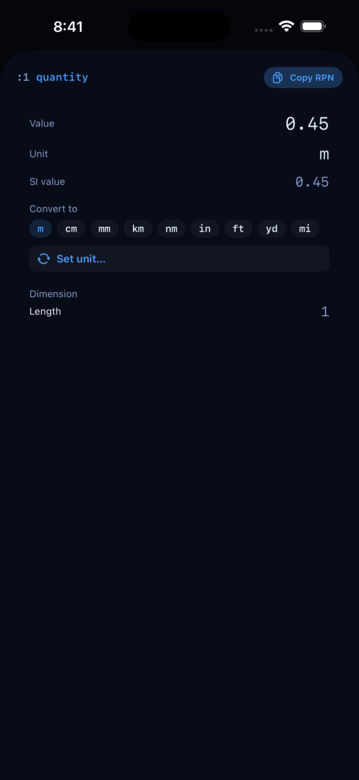
Picker. Push a bare number, tap the card to open its detail sheet, then tap Set unit…. A discovery-driven picker opens, organized by category (length, mass, time, temperature, …). Tap to assign. After assigning, the value’s type flips to a Quantity and the detail card now shows convert-to pills for the dimension family.
Arithmetic across units
Operations carry units automatically:
+and-between two Quantities require compatible dimensions; the result takes the first operand’s display unit.+and-between a Quantity and a bare number treat the bare as a count of the Quantity’s unit. So4_m 1 +gives5_m.*and/multiply or divide dimensions:60_mi 2_h /gives30 mi/h.SIMPLIFYcanonicalizes the unit (mi/h→ an explicit speed unit if one exists).
Converting
CONVERT takes a Quantity on X and a target unit symbol on Y (or as a string parameter) and re-expresses the value:
0.45_m "in" CONVERTStack:
For a Quantity on the stack, tap the card to open its detail sheet — the Convert to section shows quick-pick pills for the most-common compatible units (m, cm, mm, km, in, …). Tap a pill to convert in place; the card value updates without dismissing the sheet, so you can keep exploring conversions. Tap More… to open the full picker if the unit you want isn’t in the quick-picks.
Set unit — reinterpret without converting
Sometimes you picked the wrong unit initially — 5_m when you meant 5_m². Converting won’t help (m and m² aren’t dimensionally compatible); you’d have to explode the Quantity, drop the string, and re-attach. The Quantity detail card avoids the cliff.
Below the Convert to row is a Set unit… button. Tap it and the picker opens with every registered unit, not filtered by dimension. Pick any unit and the current value is stripped of its old unit and re-attached to the new one — the numeric value is preserved.
OBJ-> on a Quantity
For scripting, OBJ-> on a Quantity explodes it into (display-value, unit-symbol):
5.5_kg OBJ-> # → 5.5 "kg"Symmetric decomposition to the other explode-shape words (OBJ-> on Object, Array, Stack, Vec3, Complex, Fraction, Class instance). The Set unit… affordance uses this shape internally.
Units on card calcs
Card-calc rows whose values are Quantities carry a small unit chip to the right of the value — [km ▾] on a distance row, [/mi ▾] on a pace row. Tap the chip to switch the row’s unit; the stored value is unchanged, only the display and the input keyboard’s expected unit shift. Any unit you’ve registered with UNIT-DEF shows up in the compatible list automatically. See the Card calcs page.
Custom units
UNIT-DEF lets you register a new unit:
"smoot" "length" 1.7018 _m UNIT-DEFAfter this, 1_smoot parses and 5_smoot "m" CONVERT returns the right distance. Custom units persist across sessions.