Guide · 02
The stack
In RP42 the stack is a list of values, with the top — the X register — at the bottom of the visible column, growing upward as you push more.
Each card knows its type
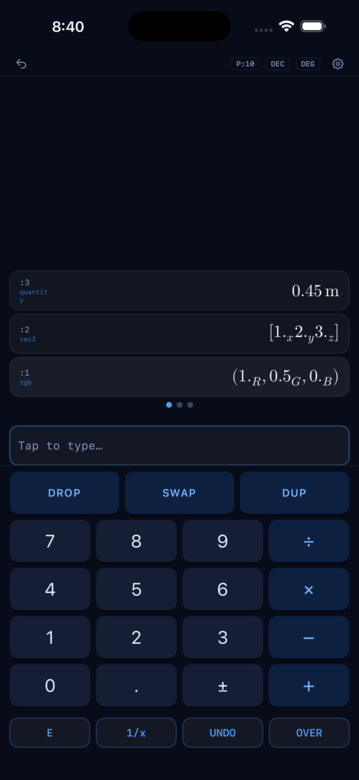
RP42 doesn’t render every value as plain text. Each stack slot is a card whose appearance depends on the type sitting in it:
- Numbers render in real LaTeX — proper exponents, fractions, vectors when relevant.
- Booleans become a colored pill (green True, red False).
- Integers wear a radix badge —
DEC,HEX,OCT,BIN. - Quantities show their unit alongside the value.
- Vectors and matrices lay out in grids.
- Colors render with their swatch and primary coordinates.
- Timecode keeps its frame separator.
That visibility is the whole point. A calculator stack has always known the types of its values; RP42 just shows them to you.
Interacting with a card
The full gesture map, iPhone-first:
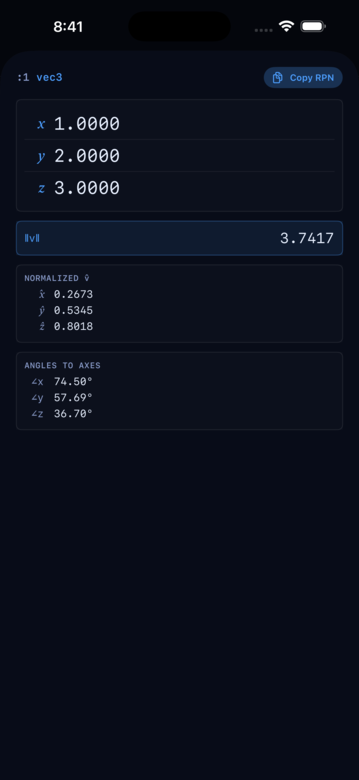
- Tap anywhere on the card to open its detail sheet. Detail sheets are typed: a vec3 card opens to a property breakdown, an
xyY(orrgbspace) card opens to a chromaticity diagram, aneotfcard opens to its transfer curve, a matrix card opens to a 3×3 grid. - Double-tap anywhere on the card to copy its display value to the clipboard. A “Copied: …” toast confirms.
- Swipe left (iPhone) to remove that level — the card slides to reveal a Remove pill and commits when the swipe passes threshold. Same gesture every iOS user already knows for delete.
- Long-press (iPhone) to pick the card up for reorder; drag vertically and the neighbors slide aside to preview the landing slot. Release to commit.
- Right-click (Mac) for the context menu — Remove level N, Copy as RPN. Copy itself is on double-click, same as iPhone.
Removing values
Three paths:
DROPfrom the keypad removes level 1.- Swipe the card left (iPhone) to remove a specific level — handy when you want to drop something in the middle of the stack without cycling to it via ROLLs.
- Right-click → Remove level N (Mac) does the same on desktop.
Stack depth and scrolling
The stack has no fixed height. As you push more values the stack scrolls; drag vertically anywhere on the stack area to reveal higher levels. The level labels (:1 :2 :3 …) count from the X register up, so you can always tell where you are.
The stack as a value
A whole stack can be captured as a first-class value — a Stack — so that you can pass one around, hand it to a word, or use it as a private working area. The literal syntax uses doubled parens:
(( 1 2 3 )) # a Stack containing three itemsConstructors and deconstructors mirror the other container types:
| Word | Effect |
|---|---|
n_ ->STACK | Consumes n items from the runtime, packages them into a Stack |
STACK-> | Explodes a Stack back onto the runtime, pushes count last |
OBJ-> | Same as STACK-> — the universal explode-a-container verb |
Frame primitives
PUSH-FRAME and POP-FRAME use the Stack type to make the runtime itself saveable. PUSH-FRAME consumes a Stack, saves the current runtime, and replaces the runtime with the contents of the saved value. POP-FRAME reverses it: packages the current runtime into a Stack, restores the prior one, and pushes the captured Stack on top.
Together they form a scoped sandbox — anything you compute inside a frame stays there unless you deliberately lift it out. The MathExpr detail card uses this to run a live-preview solver without disturbing your working stack. See Solver for how a detail card composes with the frame model.
Stack operators
Beyond the classic Forth vocabulary (DUP SWAP OVER NIP DROP ROT), RP42 ships parametric-arity variants plus concatenative combinators for scripting inside << body >> lambdas.
Parametric — arity on TOS:
| Word | Effect |
|---|---|
DUPn | Duplicate the top n items |
DROPn | Drop the top n items |
PICK | Copy the item at level n to TOS |
SWAPn | Swap TOS with the item at level n |
NIPn | Drop the item at level n |
TUCKn | Copy TOS and insert it at level n |
ROLLUn | Roll the top n items up (bring level n to TOS) |
ROLLDn | Roll the top n items down (push TOS to level n) |
REVERSEn | Reverse the top n items |
Fixed-arity conveniences:
| Word | Definition | Notes |
|---|---|---|
DUP2 | OVER OVER | Duplicate the top pair |
DROP2 | DROP DROP | Drop the top pair |
SWAP2 | swap top two pairs | (a b c d — c d a b) |
OVER2 | copy pair NOS | (a b c d — a b c d a b) |
TUCK | SWAP OVER | ANS Forth’s fixed-2 TUCK |
-ROT | ROTD | Forth-familiar alias |
?DUP | DUP if truthy | Non-zero scalars and non-scalar values dup; zeros pass through |
Concatenative combinators — take Progn values (<< ... >>) and apply them:
| Word | Stack effect | Description |
|---|---|---|
DIP | ( x q -- x ) | Save TOS, run q on the rest, restore TOS |
KEEP | ( x q -- ..y x ) | Run q with x on the stack, then push a copy of x on top |
BI | ( x p q -- ..p(x) ..q(x) ) | Apply two Progns to the same value |
TRI | ( x p q r -- ... ) | Same with three |
BI@ | ( x y q -- ..q(x) ..q(y) ) | Apply one Progn to two values |
BI* | ( x y p q -- ..p(x) ..q(y) ) | Apply two Progns pairwise |
These are load-bearing for card-calc method bodies once the scripts get non-trivial — they let you factor a common receiver-then-transform pattern into two composable pieces.