Guide · 10
Solver
Push an equation the way you’d push a number. Tap it. A live solver card opens, with the equation rendered in publication-quality LaTeX and a picker for which variable you want to solve for. Type the known values into the other rows and the answer appears in the headline as you scrub — no separate “compute” step. When you like what you see, one tap commits the answer back to the stack.
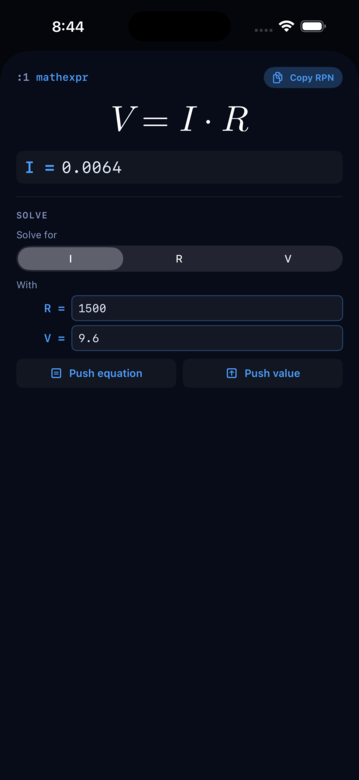
This is the biggest new thing in RP42. Equations are first-class stack values — a mathexpr type sitting between double and matrix in the type system. Twelve canned formulas ship built-in; you can lift your own from a string. The engine treats them symbolically, LaTeX-renders them for the card, and hands them to a real closed-form-then-numerical solver pipeline.
What is a MathExpr?
A MathExpr is a symbolic equation stored on the stack. The engine keeps it as a tree of nodes (add, multiply, power, function calls, comparisons), not as a string — so it renders as LaTeX on its card, deparses back to the original source, and supports arithmetic operations that build up larger expressions.
Constructing one
From a string. ->EXPR takes a String and parses it into a MathExpr. The parser understands standard infix notation with + - * / ^, function calls, and both = (assignment/equation) and grouping parens:
"a*x^2 + b*x + c = 0" ->EXPR
"y = m*x + b"        ->EXPR
"F = m*a" ->EXPRConstants like pi and e resolve to their numeric values at parse time; everything else stays as an unbound name.
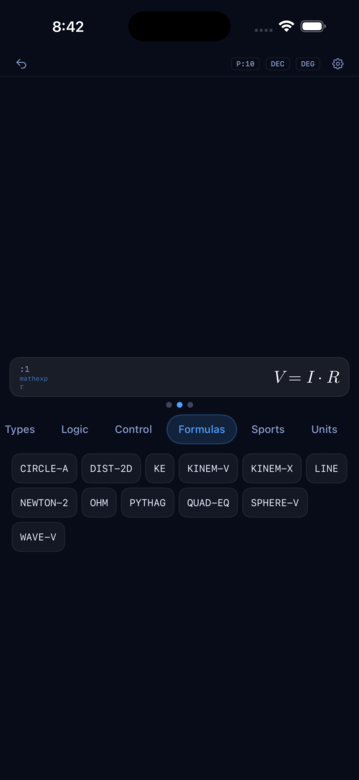
From a canned formula. A dozen famous equations ship as no-arg push words under the Formulas category:
| Word | Equation | Domain |
|---|---|---|
QUAD-EQ | a x² + b x + c = 0 | Algebra |
PYTHAG | a² + b² = c² | Geometry |
LINE | y = m x + b | Algebra |
DIST-2D | d² = (x₂−x₁)² + (y₂−y₁)² | Geometry |
CIRCLE-A | A = π r² | Geometry |
SPHERE-V | V = (4/3) π r³ | Geometry |
NEWTON-2 | F = m a | Physics |
OHM | V = I R | Physics |
KE | KE = (1/2) m v² | Physics |
WAVE-V | v = f λ | Physics |
KINEM-V | v = v₀ + a t | Kinematics |
KINEM-X | x = x₀ + v₀ t + (1/2) a t² | Kinematics |
Tap one and the equation lands on the stack, ready to solve.
Inspecting an equation
Four extractor words tell you what a MathExpr contains:
| Word | Pushes | Notes |
|---|---|---|
SYMBOLS | Array of free names | Filters out resolved constants (pi, e, phi, i) |
DEGREE | Integer polynomial degree in the given target | Integer(-1) if not polynomial |
LHS | Left-hand side as a MathExpr | Whole expression if not an equation |
RHS | Right-hand side as a MathExpr | Value(Integer(0)) if not an equation |
QUAD-EQ SYMBOLS               # → ['a, 'b, 'c, 'x]
QUAD-EQ 'x DEGREE             # → 2
LINE LHS                      # → y
LINE RHS                      # → m*x + b
Solving
The solver comes in three shapes, distinguished by what you want back:
SOLVE— pushes the bare result value (or an array for multi-root).SOLVE-EQ— pushes a MathExpr of the formtarget = valueso the answer is self-documenting.SOLUTION— pushes an Object with the bindings and the answer, useful when you want to record a whole scenario.
Each accepts up to four argument shapes:
<expr>              SOLVE          # arity-1: solve for the sole free symbol
<expr> <target>     SOLVE          # arity-2: target explicit, no other bindings
<expr> <bindings>   SOLVE          # arity-2: bindings given, target auto-detected
<expr> <target> <bindings>  SOLVE  # arity-3: everything explicit
Bindings are an Object mapping name → value. Build one with the literal { } marker syntax:
OHM 'V { "I" 2 "R" 10 } SOLVE            # → 20
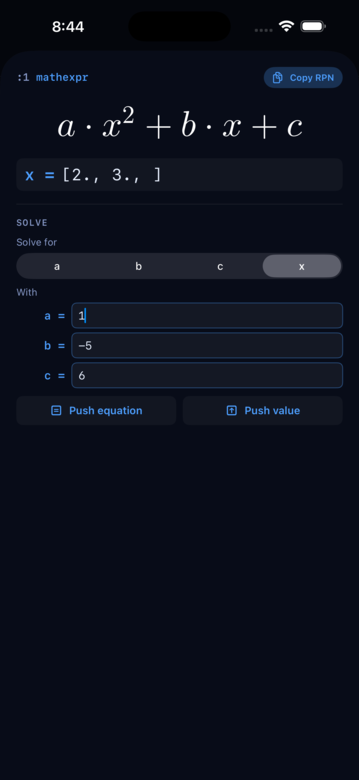
QUAD-EQ 'x { "a" 1 "b" -5 "c" 6 } SOLVE  # → [2, 3]
The solver runs a dispatch pipeline internally: it tries the closed-form polynomial path first (linear, quadratic, cubic, quartic — the CUBIC and QUARTIC words are exposed separately if you want them), then symbolic isolation with linear and unary-function inversion, then a numerical Newton-Raphson fallback for the transcendental cases (x + cos(x) = 0 and friends). Multi-root polynomial degrees ≥5 route through Aberth-Ehrlich for stability.
When no real root exists — x² + 1 = 0 — the solver auto-promotes to Complex and returns [i, -i]. When all names are bound the arity-2-bindings shape auto-degrades to a Boolean equality check.
The MathExpr detail card
Tap a MathExpr card and the detail sheet gives you a live-preview solver:
- The equation renders large as LaTeX up top.
- Below that, a Solve section: pick the target from a segmented picker, fill in the other bindings, and the answer appears in a headline row that updates as you change the numbers.
- Two push buttons — Push equation (fires
SOLVE-EQ) and Push value (firesSOLVE) — commit the answer back to the stack, leaving the original equation preserved just below.
SOLVE-RESID for validation
SOLVE-RESID takes an equation, a target name, and a candidate value, and pushes the residual f(target = value). Zero means the value is a root; non-zero means it isn’t. Useful when you’re testing a hypothesis or verifying a hand-computed answer:
QUAD-EQ 'x 2 { "a" 1 "b" -5 "c" 6 } SOLVE-RESID    # → 0  (2 is a root)
QUAD-EQ 'x 4 { "a" 1 "b" -5 "c" 6 } SOLVE-RESID    # → -2 (4 is not)
What’s not here yet
The solver is not a CAS. It doesn’t do partial-fraction decomposition, doesn’t integrate or differentiate for you (though the internals do differentiate for Newton’s method), and doesn’t simplify algebraically the way Mathematica would. It handles:
- Linear equations, always
- Polynomials up to degree 4 in closed form
- Polynomials degree 5+ numerically (Aberth-Ehrlich)
- Transcendentals with a single free variable via Newton-Raphson
- Real→Complex auto-promotion when no real root exists
- Equations or bare expressions (implicit
= 0) — anything except inequalities
That covers most everyday physics, algebra, geometry, and kinematics. If your problem is genuinely CAS-shaped — trigonometric identities, closed-form integrals — the solver will punt.